Webhooks let Bobsled notify your systems when something happens in your organization: a Transfer starts, completes or fails, or a Sledhouse Table sync runs. Each event is sent as an HTTPS POST with a JSON body to a URL you choose.
Typical uses are alerting, ticketing, and forwarding Bobsled activity into your monitoring or log platform.
NOTE: Webhooks carry the same events you see in Bobsled's activity log: events about your Shares, Transfers and Sledhouse resources. They are not infrastructure or system logs.
How delivery works
One event per request.
POSTwithContent-Type: application/json;charset=UTF-8; the body is a single JSON object.Success is any 2xx response. Respond within 15 seconds and queue slow processing on your side.
Failed deliveries are retried with exponential backoff when your endpoint times out or returns a non-2xx status.
At-least-once delivery. The same event can arrive more than once, so deduplicate on
id(Transfers events) orlogId(Sledhouse events). Events can arrive out of order; usetimestamp.Fixed source IP. Each Bobsled environment sends webhooks from a dedicated static IP address (see Allowlisting Bobsled's IP address).
Creating a webhook
You need the Owner or Member role.
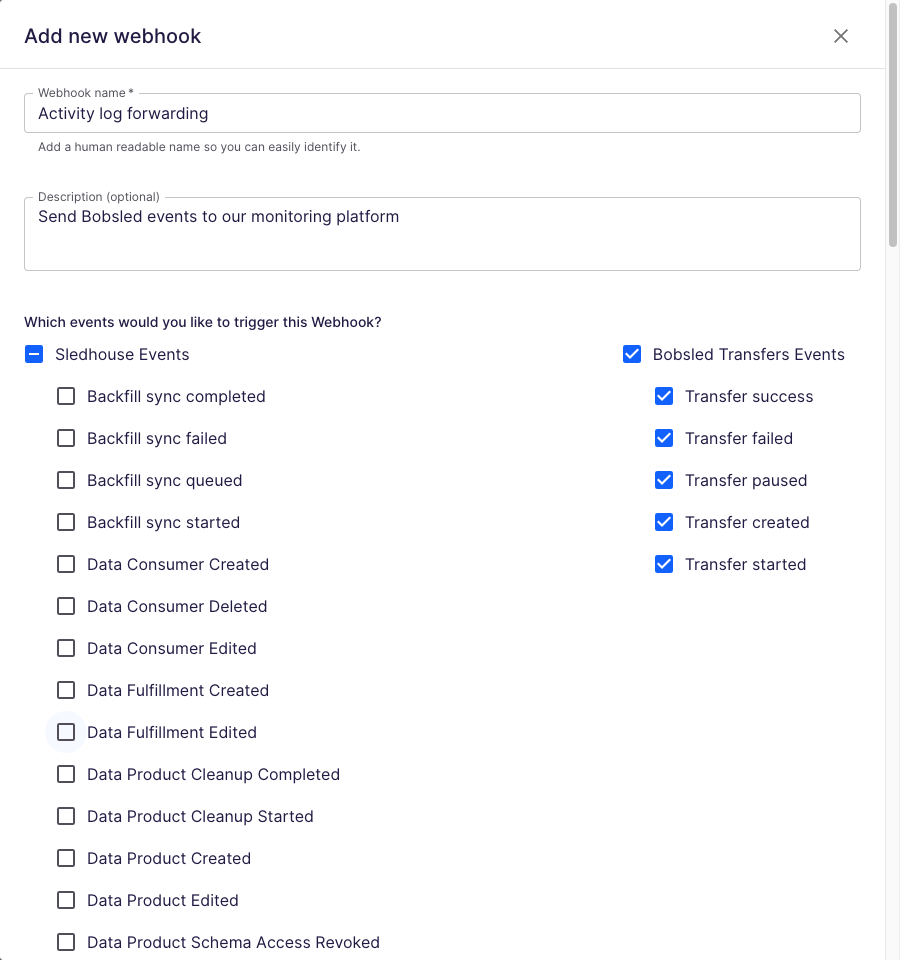
Select Webhooks in the left navigation, then select Add Webhook.
Enter a Webhook name and an optional Description.
Choose the events to receive (see Choosing events).
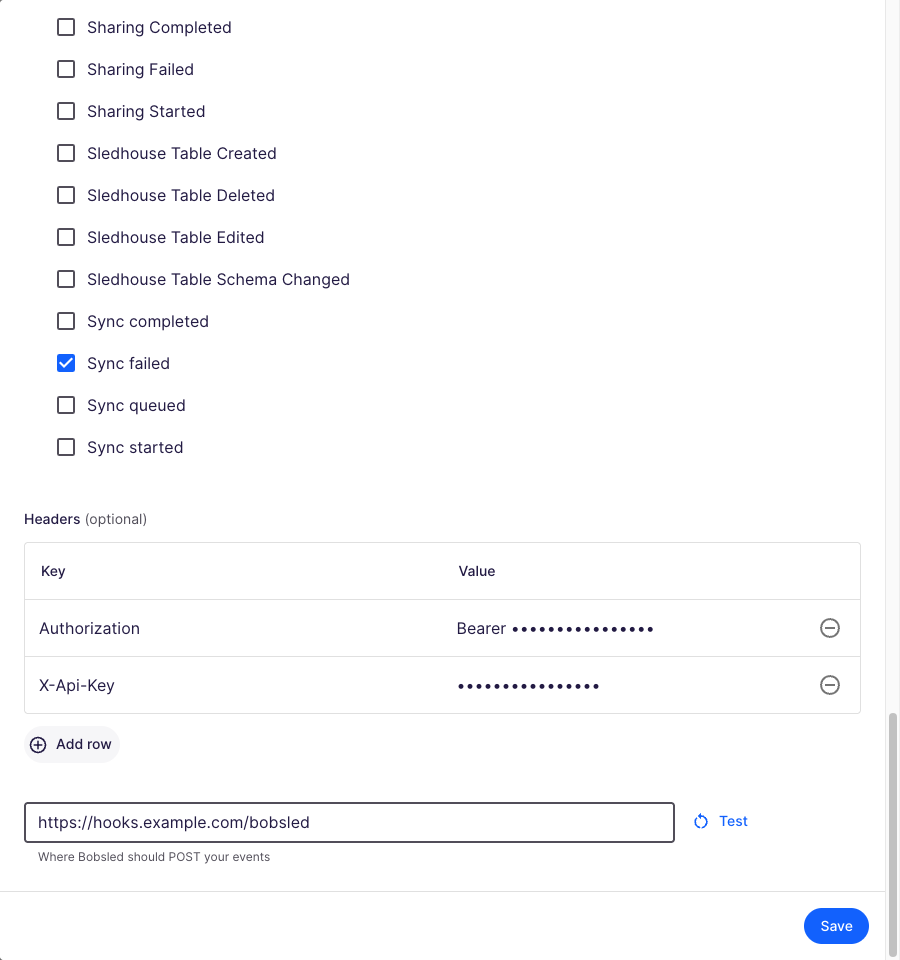
Optionally add up to 20 Headers (key and value), typically used for authentication.
Enter the Callback URL (
https://…). Query parameters are kept as entered.Select Test to send a sample request to your endpoint, then select Save.
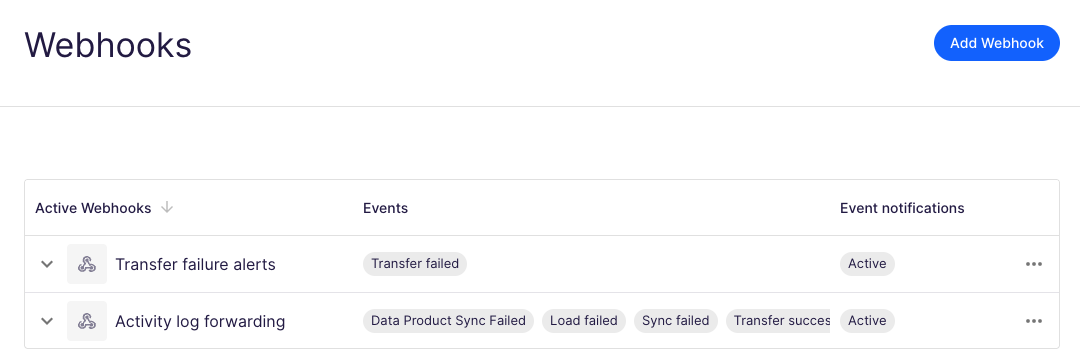
Your webhooks are listed with the events each one receives:
You can also manage webhooks through the REST API: Create ↗, Update ↗, List ↗, Get ↗ and Delete ↗.
Choosing events
Bobsled Transfers events
Select any of the five event groups (API field transfersConfig.eventCodes). In the API, omitting transfersConfig delivers all Transfers events and an empty list delivers none.
UI option | API value | Payload eventIds delivered |
|---|---|---|
Transfer created |
|
|
Transfer started |
|
|
Transfer success |
|
|
Transfer failed |
|
|
Transfer paused |
|
|
Sledhouse events
If Sledhouse is enabled for your organization, you can select individual Sledhouse events (API field sledhouseConfig.eventCodes). They cover Sledhouse Tables (created, edited, deleted, sync and load started/completed/failed, schema changes), Data Consumers and Fulfillments, destination access grants and revocations, and Data Products (sync, sharing, view and table changes). The full list of codes is in the API reference ↗.
Payload schema
Bobsled sends one of two payload formats depending on the event type. The full machine-readable schemas are in the API reference: Transfer Events payload ↗ and Sledhouse Events payload ↗.
Transfers events
Field | Type | Description |
|---|---|---|
| string | Unique event id. Use it for deduplication. |
| string | When the event occurred (ISO 8601). |
| string |
|
| string | Event type, for example |
| string | Always |
| string | Human-readable event name, for example |
| string | Human-readable description. |
| string | Id of the user or system that triggered the event. |
| string | Email of the user that triggered the event. |
| string or null | Transfer run id, when applicable. |
| object | Transfer details (see below). |
extraProperties contains:
Field | Type | Description |
|---|---|---|
| string | The Transfer. |
| string | The Share the Transfer belongs to. |
| object | Status and metrics of the Transfer (see below). |
| array or null | Only on |
transferMetadata contains:
Field | Type | Description |
|---|---|---|
| string |
|
| string |
|
| integer | When the Transfer was created (epoch milliseconds). |
| array | Errors for a failed Transfer, each with an |
| number | Volume moved, when known. |
| number | Rows loaded and the resulting table size, for warehouse destinations. |
| object | Per-table events only: |
| object | Per-file events only: |
Example:
{
  "id": "7c1e9a2f-…",
  "timestamp": "2026-10-06T14:02:11.000Z",
  "level": "ERROR",
  "eventId": "transfer.failed",
  "eventEntity": "TRANSFER",
  "eventName": "Transfer failed",
  "eventDescription": "A transfer failed",
  "authorId": "…",
  "authorEmail": "user@example.com",
  "runId": "…",
  "extraProperties": {
    "transferId": "…",
    "shareId": "…",
    "transferMetadata": {
      "transferType": "automated",
      "lastTransferStatus": "failed",
      "createdAt": 1791295331000,
      "errors": [{ "exception": "FileTransferFailed", "message": "…" }]
    }
  }
}
Sledhouse events
Field | Type | Description |
|---|---|---|
| string | Unique event id. Use it for deduplication. |
| string | When the event occurred (ISO 8601). |
| string | Event code, for example |
| string | Human-readable form of the code, for example |
| string |
|
| string |
|
| string or null | The user, for |
| string | Human-readable explanation. |
| array | Affected resources as |
| string | Job id, on job events. |
| object | Event-specific details. |
Example:
{
  "logId": "…",
  "timestamp": "2026-10-06T14:05:00.000Z",
  "code": "shtSyncFailed",
  "eventName": "Sync failed",
  "level": "Error",
  "trigger": "System",
  "author": null,
  "message": "…",
  "resource": [{ "type": "sledhouse_table", "id": "…", "name": "orders" }],
  "jobId": "…",
  "details": { "errorMessage": "…" }
}
Securing your endpoint
Bobsled does not sign payloads. Protect your endpoint with a secret in a custom header (for example Authorization: Bearer <token>) or in the Callback URL's query string, and allowlist Bobsled's IP address.
Allowlisting Bobsled's IP address
Every webhook from your Bobsled environment comes from a single, dedicated static IP address. Contact your Bobsled account team or support for your environment's address.